
Operational intelligence for Microsoft Purview Data Loss Prevention with AlertFusion365
Transform raw DLP alerts into structured, auditable incidents with faster triage, richer context, and measurable security outcomes.
Designed to run entirely within your environment, AlertFusion365 enhances Microsoft Purview DLP without replacing it.
Faster Triage → Measurable Operational Maturity → Audit-Ready Outcomes

AlertFusion365 For Microsoft Purview DLP
What is AlertFusion365
AlertFusion365 is an advanced Microsoft Purview Data Loss Prevention (DLP) alert and incident management platform that transforms fragmented DLP operations into a unified, efficient and intelligence-driven workflow. It gives organisations complete visibility across Microsoft 365, accelerates triage, and delivers consistent, auditable, end-to-end incident handling — all within a customer-hosted environment.
By integrating seamlessly with Microsoft Purview, AlertFusion365 turns raw DLP signals from Exchange, SharePoint, OneDrive, Teams, endpoints and cloud apps into clear, contextualised stories. Alerts become easier to understand, faster to investigate, and simpler to resolve. Analysts move from reactive chasing to confident, structured decision-making. AlertFusion365 replaces spreadsheets, disconnected tools and slow manual processes with an intuitive investigation workspace, automated correlation logic, and a repeatable operating model that reduces fatigue and strengthens organisational readiness.
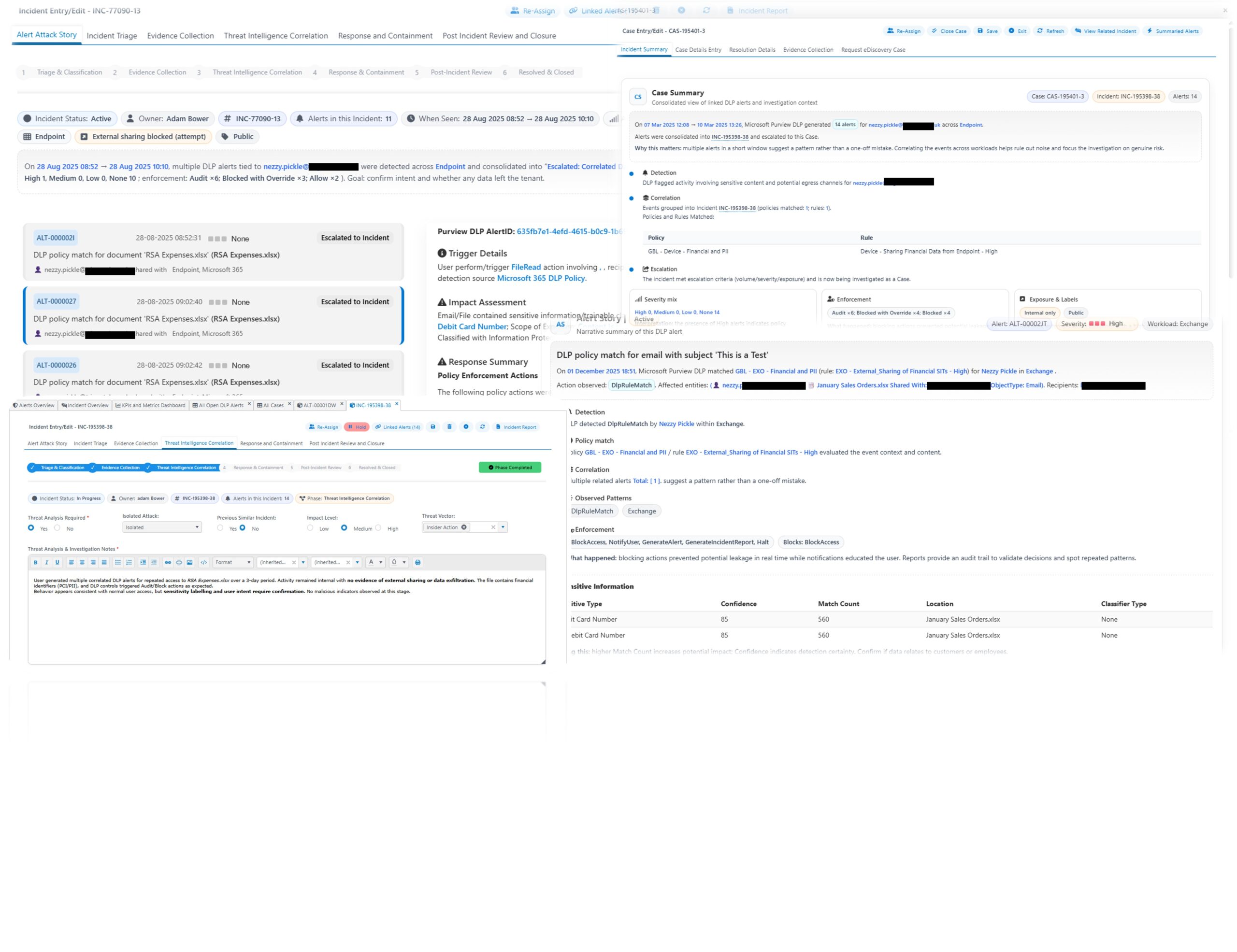
What Makes AlertFusion365 Different
AlertFusion365 transforms Microsoft Purview DLP alerts into clear, contextualised incidents that teams can act on with confidence.
It automatically correlates related alerts into a single incident, removing noise and helping analysts focus on genuine risk. A guided, end-to-end workflow takes each incident from detection to closure, with built-in SLA tracking and a full audit trail to support compliance and governance.
Every alert is enriched with forensic activity, sensitive information context, policy conditions and user or device details — all presented in a single investigation view to speed decisions and reduce investigation effort.
Real-time dashboards provide visibility into alert volumes, response performance and risk trends, while the DLP Operating Posture Score delivers a clear, organisation-wide measure of operational maturity and data protection effectiveness.
Designed to run entirely within your environment, AlertFusion365 works directly with your existing Microsoft Purview DLP policies — no agents, no appliances, and no duplication of effort.
The Result - Security and compliance teams gain
- Faster, more consistent investigations
- Reduced alert noise and manual effort
- Clear visibility of risk and performance
- Audit-ready, defensible decision-making
Designed for Microsoft Purview DLP
AlertFusion365 works directly with your existing DLP policies — no agents, no appliances, no duplication of effort. It enhances Purview rather than replacing it, making your Microsoft 365 investment more valuable and operationally effective from day one
Frequently Asked Questions
Everything you need to know about AlertFusion365
What is AlertFusion365 and how does it enhance Microsoft Purview DLP?
AlertFusion365 is an advanced alert, incident, and case management platform designed to operationalize Microsoft Purview DLP. It unifies fragmented DLP operations, automates alert correlation, and provides guided workflows for consistent, auditable incident handling—all within a customer-hosted environment. It enriches DLP signals with context, accelerates investigations, and delivers actionable intelligence for security and compliance teams.
How does AlertFusion365 reduce alert fatigue and improve investigation quality?
By automatically grouping related alerts using file identity, user behavior, device context, and time proximity, AlertFusion365 merges duplicates and reduces noise. Analysts can focus on meaningful incidents, supported by deep forensic context and a structured investigation workspace.
What operational intelligence does AlertFusion365 provide?
The platform offers real-time dashboards showing alert trends, SLA performance, high-risk users, policy effectiveness, and investigation workload. The monthly DLP Operating Posture Score summarizes organizational maturity and risk exposure, supporting data-driven leadership decisions.
How does AlertFusion365 support compliance and audit requirements?
Every note, decision, attachment, and action is captured in a tamper-resistant audit trail. Role-based access, governance settings, and configurable rules ensure consistent, auditable processes aligned with regulatory requirements.
Does AlertFusion365 require changes to existing DLP policies or infrastructure?
No. AlertFusion365 works directly with your existing Microsoft Purview DLP policies—no agents, appliances, or duplication of effort are required. It enhances, rather than replaces, your current investment.
What are common troubleshooting steps if DLP alerts are not being generated?
- Ensure policy scope and conditions are correct and realistic.
- Verify “Send alert” is enabled and recipients are configured.
- Confirm you have the necessary admin permissions.
- Check that Unified Audit Log is enabled in Purview.
- Allow time for processing delays; alerts may take minutes to appear.
- Test with known sensitive data in “Test mode with notifications” before enforcing.
Can AlertFusion365 or Microsoft Purview DLP policies be integrated with external applications?
Microsoft Purview DLP policies are primarily designed for Microsoft 365 workloads. While there is no dedicated SDK for embedding DLP policies in external apps, APIs such as Microsoft Graph Security API and Compliance Center APIs can be used to pull DLP alerts and incident data into other systems for monitoring and automation.
What browsers and platforms are supported for Endpoint DLP?
Endpoint DLP supports Windows 10/11 and the latest MacOS versions. Supported browsers include Microsoft Edge, Google Chrome (with extension), and Firefox (coming soon). Safari is supported on MacOS.
Speak to an IDS expert
Let’s map your Data Security, Governance & Compliance outcomes using Microsoft 365 Purview.
